The AI copilot
The copilot is a large language model that plans gating strategies and drives the application through the same actions you would take by hand.
It is not AI-1. AI-1 is our own model, runs on-device, and identifies a fixed population list. The copilot is a general reasoning model that works in plain language and can attempt anything — with correspondingly different trust properties.
Using it requires a license; the 30-day trial includes it.
The application computes the gates; the language model does not invent them
Section titled “The application computes the gates; the language model does not invent them”Ask for standard populations — lymphocytes, single cells, live cells, T cells, CD4 or CD8 T cells, B cells, NK, NK-T or monocytes — and the application builds the hierarchy itself, before the language model says a word:
- Scatter and singlet gates are computed from your data — a singlet band along the FSC-A/FSC-H diagonal with doublets excluded, and a scatter gate around the cells of interest.
- Lineage gates come from AI-1, our gating model, nested under them in the right order: Singlets → CD3 → CD4 / CD8.
- Where AI-1 declines a population, the app measures a data-driven cut inside the parent population instead — and where that cut is not reliable, nothing is proposed and the reason is stated, rather than a guess drawn.
The language model plans, explains and handles everything outside that list.
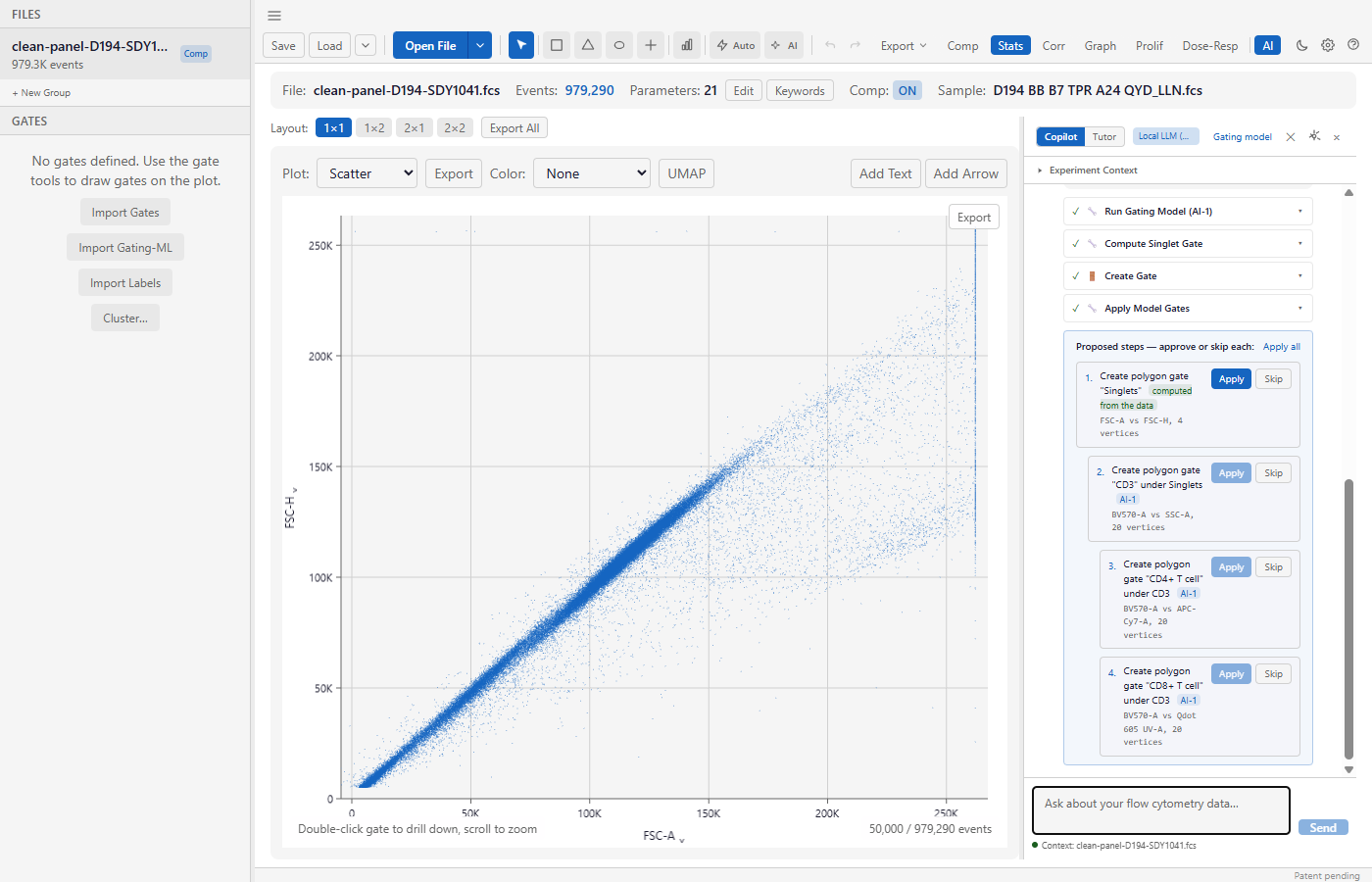
Nothing is created until you click Apply (or Apply all). Each proposal says where its boundaries came from and which gate it sits under.
Every proposed gate says where it came from
Section titled “Every proposed gate says where it came from”Each proposal carries a label: computed from the data, AI-1, data-driven — provisional, review, or — once you move it — edited by you. Hover it to see the method, its confidence, the population it was measured in and the cut values.
The rule behind the labels: a gate’s coordinates must come from the data. A lineage or singlet gate is only created if its boundaries came from a measurement in the conversation, from AI-1, or from numbers you typed. A language model cannot place a fluorescence gate from its imagination.
Your method wins
Section titled “Your method wins”If you name your own axes, thresholds, controls (FMO, isotype) or existing gates, the assistant follows your method and does not impose its own hierarchy. “Gate X, then Y” produces nested gates, children are proposed after their parents, and any gate the assistant moves is listed so you can see what changed.
Memory and regulatory T-cell subsets
Section titled “Memory and regulatory T-cell subsets”“Naive, central memory, effector memory and TEMRA on CCR7 vs CD45RA” and “Tregs (CD25+ CD127lo)” are proposed as data-driven gates under the right parent, with conventional names. These are new — review them carefully. Where a marker does not separate cleanly (dim CD27 is a common case), the assistant says so and asks for a cut or a control rather than guess.
How well it works — measured, not asserted
Section titled “How well it works — measured, not asserted”We score the assistant’s gates cell by cell against expert FlowJo gating using the F1 score: the balance of precision (how many of the gate’s cells the expert also selected) and recall (how many of the expert’s cells the gate captured), where 1.0 means identical. On held-out files the rules were not tuned on, its CD3, CD4 and CD8 T-cell gates scored about 0.75, 0.88 and 0.83 — with the local Qwen 2.5 7B model as well as with cloud models.
These measurements cover T cells and the scatter, singlet and live gates. B-cell, NK and monocyte accuracy has not yet been measured on our expert-gated benchmark.
It talks when you talk, and acts when you ask
Section titled “It talks when you talk, and acts when you ask”A greeting gets a reply, not an analysis. Questions about your data are answered with read-only tools; gates are proposed only when you ask for them. When it stops, it says why — a marker your file does not measure is named, rather than a generic error.
Start with the gating model
Section titled “Start with the gating model”Open the copilot with a file loaded and the first thing it offers is not to answer a question — it is to run AI-1, our own gating model.
That is deliberate, and it is a correction. For identifying populations AI-1 is the stronger of the two, and it was the harder one to find: it lived behind a different button, and the copilot would never mention it. Across two dozen scripted runs on local models, the copilot chose to run it zero times. The capability was there; nothing led anyone to it.
The offer tells you how long it will take on your machine, not in general. The same file can be a couple of minutes on a workstation and considerably longer on an instrument PC, and that difference is the whole basis for deciding whether to wait. The estimate is learned from your own completed runs and errs slow, so a normal run finishes early.
If you would rather ask something first, dismiss it — a Gating model control stays in the copilot’s header for the rest of the conversation. Ask three unrelated questions and then decide you want a hierarchy, and it is still there.
You do not have to run it yourself: when you ask for standard populations, the assistant runs it as part of building the hierarchy (above).
What you see, and what the assistant sees
Section titled “What you see, and what the assistant sees”When the model finishes, its result appears in the conversation rendered by the application: the verdict first, then the populations it stands behind, the cut it chose for each, and what it is reading. Every figure on screen comes from the model that produced it.
When you run it this way, the assistant is not given those figures. It is told which populations were named and what the verdict was — no percentages, no counts, no cut values.
This matters more than it sounds. Where AI-1 declines to stand behind a result it withholds the numbers rather than printing them with a caveat, because a number on screen can be copied into a report regardless of what is written beside it. An assistant holding those figures could reintroduce them in a sentence, and a paraphrased number is one nobody can trace back.
It can still help you interpret what is on screen and answer follow-up questions about it.
The proposed steps go to the gate list
Section titled “The proposed steps go to the gate list”The gating model proposes a hierarchy, not a flat set — scatter, then singlets, then CD3, then CD4 and CD8 beneath it — and those steps appear in the gate sidebar under Proposed — not yet gates.
Nothing has been created. Nothing is counted in your statistics. Each step names the parent it is waiting on, so the order is visible rather than implied, and you accept them one at a time. A strictness control lets you trade a purer population against a smaller one before you accept anything.
Propose, then approve
Section titled “Propose, then approve”The copilot never changes your analysis on its own.
You describe what you want. It lays out a strategy — one step per gate, each with a stated rationale. You execute the steps you agree with and skip the ones you don’t. Gates and statistics update as you approve each step.
Approved steps are recorded, and the record can be exported — which is what makes an AI-assisted analysis defensible rather than merely fast. If you cannot say how a figure was produced, it does not matter how quickly you produced it.
What it can do
Section titled “What it can do”It has access to the operations you do by hand, among them:
- create and modify gates
- compute a singlet gate (a band along the FSC-A/FSC-H diagonal, doublets excluded) and a scatter gate from the data
- find a threshold on a marker within a parent population — reporting its confidence, and only calling a cut confident when the data supports it
- read statistics for any population
- run clustering-based auto-gating
- inspect metadata, channels and keywords
- read the AI-1 competence report
- place the gates AI-1 proposed, using the model’s own boundaries rather than geometry of its own — it is instructed not to hand-draw a population the model has already drawn, because the model’s boundary carries measured fidelity and an estimate does not
Because it can read AI-1’s competence report, it can also tell you when our own model declined a population and reason about what to do instead.
Choosing a provider
Section titled “Choosing a provider”| Provider | Where your data goes |
|---|---|
| Claude (Anthropic) | Anthropic’s API |
| Amazon Bedrock | Your AWS account |
| OpenAI | OpenAI’s API |
| Local model (built-in engine / Ollama) | Nowhere — runs on your machine |
Configure this in Preferences → AI.
For Anthropic and OpenAI the model list stays empty until you enter your API key; the key then loads the provider’s current models and one is selected for you — the newest Claude Sonnet, or GPT-6.1 (GPT-5.5 where 6.1 is not available). Choose another at any time; your choice is kept.
OpenAI’s newest models accept tools only through OpenAI’s newer API; the app routes them there automatically, with storage on OpenAI’s side turned off.
Where your API keys are kept
Section titled “Where your API keys are kept”Credentials go into your operating system’s own credential store — Windows Credential Manager, the macOS Keychain, or the Secret Service (GNOME Keyring / KWallet) on Linux. They are never written to a file inside the app’s data directory, and the app never reads a key back out to display it: the settings panel shows only whether a key is set.
The settings panel names the store it is using, so you can confirm it. If your Linux session has no Secret Service running, the panel says so and you can use Session-only keys instead — credentials then live in memory for that run and are never stored at all.
Upgrading from 0.1.4 or earlier moves any keys already saved into the credential
store the first time you open the app, and rewrites ai_settings.json without
them. Nothing is required of you.
If your institution does not permit cloud AI
Section titled “If your institution does not permit cloud AI”Use the local model option, or don’t enable the copilot at all. AI-1 is entirely on-device and unaffected by this choice — the on-device population identification is available to you either way.
A local model needs a model file downloaded and enough RAM to run it, and will be slower and less capable than a frontier cloud model. For strategy planning on a familiar panel that is usually an acceptable trade; for open-ended reasoning about an unusual experiment it is a real step down.
Which local model
Section titled “Which local model”The built-in engine offers two models, both measured on our expert-gated benchmark and both licensed for commercial use:
| Model | Recommended for | Measured CD4 / CD8 T-cell F1 |
|---|---|---|
| Qwen 2.5 14B | GPUs with 16 GB or more | 0.82 / 0.88 |
| Qwen 2.5 7B | GPUs under 16 GB, and computers without a GPU (slowly) | 0.75 / 0.76 |
The model list marks the one recommended for your hardware. The 7B needs about 6 GB of video memory to be quick; on a computer without a GPU it runs, but a long request takes minutes.
Every model we offer is licensed for commercial use. Qwen 2.5 3B (Qwen Research
License) and Command R7B (CC-BY-NC) are no longer offered, and Llama 3.1 8B is no
longer suggested for Ollama; the default Ollama model is qwen2.5:7b. A model you
already downloaded keeps working, and you can use any model you obtain yourself —
its license is then yours to check.
Checking that the built-in engine uses your GPU
Section titled “Checking that the built-in engine uses your GPU”Preferences → AI → Local LLM shows what the engine is actually running, read from the engine itself — for example Built-in engine · NVIDIA CUDA · Qwen 2.5 7B — 29/29 layers on the GPU — Context: 16384 tokens · KV cache: q8_0 · flash attention on. If the NVIDIA engine needs repair, the same screen says so; see Troubleshooting.
The other AI panels
Section titled “The other AI panels”Several panels share the copilot’s model but are aimed at specific jobs:
| Panel | What it does |
|---|---|
| Gate review | A second opinion on gates you have already drawn |
| Data check | Acquisition and quality problems worth knowing before interpreting anything |
| Report | A written summary of the analysis |
| Batch insights | Patterns across a batch rather than within one file |
| Tutor and Quiz | Flow cytometry teaching. These do not analyse your data. |
Limits worth knowing
Section titled “Limits worth knowing”It can be wrong, confidently. That is a property of language models, not a bug we are close to removing, and it is the reason nothing is applied without your click. Read each proposed step; the rationale is there so you can disagree with it.
Its prose is the model’s; the gates are the application’s. Gate geometry and the counts in the gate list and statistics are computed by the application. The assistant’s written summary is the language model’s, and with smaller local models it can misstate a number or what a marker means — rely on the gate list and the statistics table for figures. From 0.2.2 the assistant is asked to describe the hierarchy without restating numbers, and if a reply still contains a percentage or count that matches nothing the app computed (or that you typed), a note under the message says so. It cannot tell when a correct number is attached to the wrong population, so the rule stands: take figures from the gate list and statistics.
It is not a substitute for knowing your panel. It reasons from what it is told. A mislabelled channel produces a well-argued wrong strategy.
AI-1’s abstention is more trustworthy than the copilot’s confidence. When AI-1 declines a population, that is a measured statement about its own competence. When the copilot offers an opinion, it is a plausible one. Weight them differently.