Scales and transforms
Every axis has a scale, chosen independently of the parameter. Getting it wrong is the most common reason a plot looks unusable, and it is almost always mistaken for a gating problem.
Click an axis label to change the parameter and its scale.
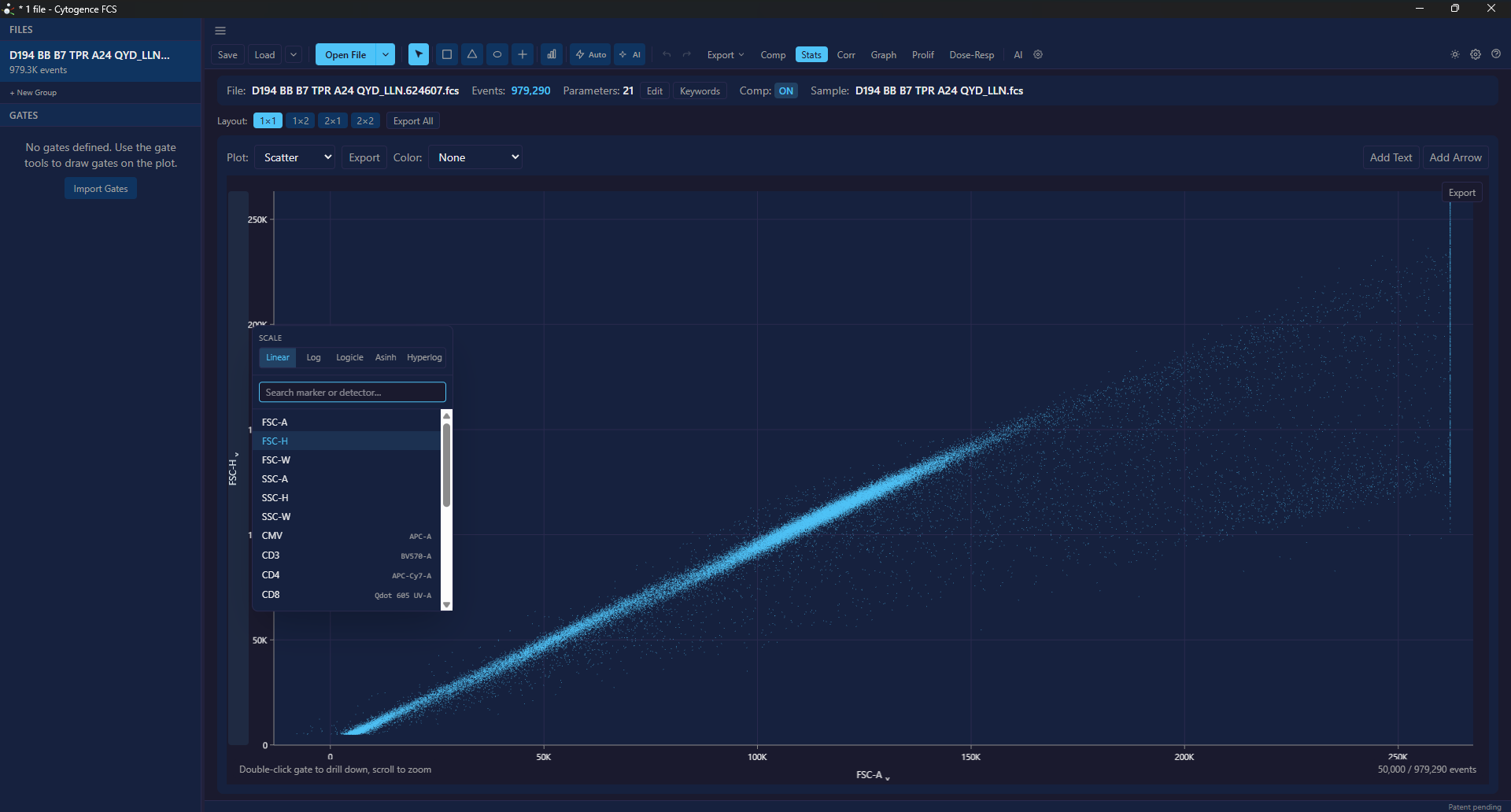
The scale row sits above the parameter list, so the scale is a choice you make per
axis rather than a global setting. Note the parameter list shows the marker on the
left and the detector on the right — CD3 on BV570-A, CD4 on APC-Cy7-A.
That pairing is what AI-1 reads.
The five scales
Section titled “The five scales”| Scale | Use it for |
|---|---|
| Linear | Scatter channels (FSC, SSC) and time. Almost never right for fluorescence. |
| Log | Fluorescence with no compensation and no negative values. Cannot represent zero or negatives at all. |
| Logicle | The usual right answer for compensated fluorescence — log-like at high values, linear near zero, so negatives from compensation still display. |
| Asinh | Similar behaviour to logicle with a simpler parameterisation; a good default when logicle needs fiddling. |
| Hyperlog | Another log-linear hybrid. Useful when logicle piles events against the axis near zero. |
Why fluorescence needs a hybrid scale
Section titled “Why fluorescence needs a hybrid scale”Compensation subtracts spillover, and subtraction produces negative values for dim and negative populations. That is expected, not an error.
A log scale cannot show a negative number. Events either vanish or jam against the axis, and a real negative population turns into a smear that looks like a staining failure. Logicle, asinh and hyperlog exist for exactly this: log-like where the data is bright, linear through zero where the data is dim.
If a population is piled against an axis or crushed into a corner, change the scale before you touch the gate.
Suggested scales
Section titled “Suggested scales”The app suggests a scale per channel from the data itself, rather than defaulting everything to linear. Treat the suggestion as a good starting point: it is derived from the distribution, not from knowledge of your panel, so a channel with unusual staining may want overriding.
Practical guidance
Section titled “Practical guidance”- Scatter: linear.
- Time: linear.
- Compensated fluorescence: logicle, or asinh if logicle needs tuning.
- Uncompensated single-colour, no negatives: log is fine.
- Anything that looks wrong at zero: try hyperlog.
Scale, compensation and gates interact
Section titled “Scale, compensation and gates interact”A gate is a region in whatever coordinate space the plot is showing. Change the scale or the compensation underneath it and the events falling inside can change.
Order that avoids surprises:
- Fix channel names and compensation.
- Choose scales.
- Gate.
If you must change a scale after gating, look at the affected gates rather than assuming they travelled with it.